Quotes
Quotes that become orders
Build quotes for customers, assign reps, track revisions and convert approved quotes into orders. The Takeoff Agent turns takeoff documents into draft quotes.
Book a DemoSee it in action
From a takeoff document to a quote in minutes
The Takeoff Agent reads a takeoff document, builds the product list with your rules and matches it to your catalog. Your rep reviews it, assigns it, and the customer accepts it online.
- Draft quotes from takeoff documents
- Assign a rep to follow up on every quote
- Accepted quotes convert into orders
deck-takeoff.pdf
Read with your rules and product data
Product list, matched to your catalog
Assist AI
Every request in one inbox, a draft quote ready for review
Emails, texts, WhatsApp messages, quote requests and internal messages land in one place. Assist AI reads the message and its attachments, matches the items to your catalog and drafts the quote, so your rep reviews and sends instead of retyping.
- Email, SMS, WhatsApp, quote requests and messages in one inbox
- Reads text and attachments, such as PDFs and photos
- Matches items to your catalog and drafts the quote
- Your rep reviews, adjusts and sends. Unmatched items follow your special-order flow
One inbox for every request
Assist AIDemo Builders
Need a price on the deck plan, PDF attached
Demo Framing
Can you quote 40 studs and 12 sheets of OSB?
Demo Decks
Photo of my handwritten list
Website
Request from the contractor portal
Draft quote for Demo Builders
Ready for reviewRead from the email and its PDF attachment, matched to your catalog
How a quote moves
- 1
Request or draft
A customer asks, or your rep or the Takeoff Agent drafts the quote.
- 2
Review and send
Your team checks the lines and pricing, then sends it.
- 3
Customer accepts
They accept from their account, or message you with changes.
- 4
Becomes an order
The accepted quote converts to an order and flows to your ERP.
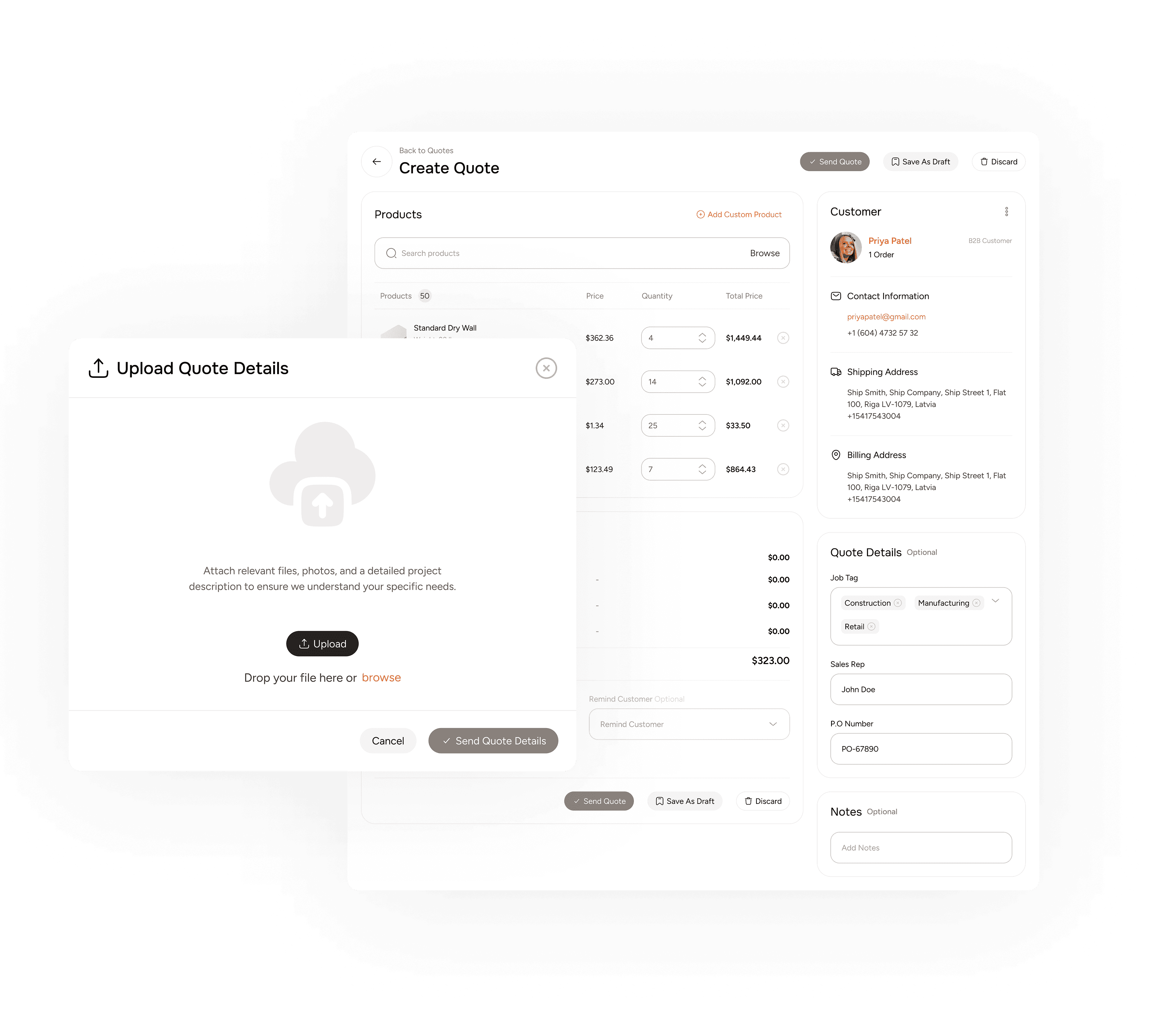
Create a Quote
Save Your Customers' Time, Create the Quote!
Build and send quotes on behalf of your B2B clients, so a contractor can get a price without filling out a single form. The Takeoff Agent can also turn a takeoff document into a draft quote.
Accept and Convert
Customers accept online, and the quote becomes an order
Customers review and accept a quote from their own account. An accepted quote converts into an order, so nobody retypes information or works from an out-of-date copy.
- One-click acceptance from the customer's account.
- Accepted quotes convert into orders automatically.
- Orders flow to your ERP like any other order.
Quote QB-20844
Pickup · Valid until Oct 6
2x4x10 SPF Stud
40 × $4.23
2x6x92-5/8 Precut Stud
24 × $8.17
Cedar Fence Board 1x8x8
12 × $8.81
Assign Sales Reps
Never Let a Quote Slip Through the Cracks
Give every quote an owner, so follow-up happens on time and does not depend on one person remembering.
- Assign a sales rep to follow up on each quote with the customer.
- Take follow-up pressure off you and the rest of the team.
- Make sure no quote is forgotten or dropped.
Assign a sales rep
Every quote has an owner
Sam
Owner
Oct 6
Due
2
Revision
Follow up with customer
Reminder set for the owner
Revised line items
Revision 2 sent to customer
Customer question
Answered in messages
Track Quotes
All Quotes in One Dashboard. Zero Confusion.
Go beyond status. See assigned reps, due dates, and revisions, and open any quote to view every detail in one place.
General
Analysis
Customer
Sales Channels
Integrations
Quotes
Assigned reps, due dates and revisions
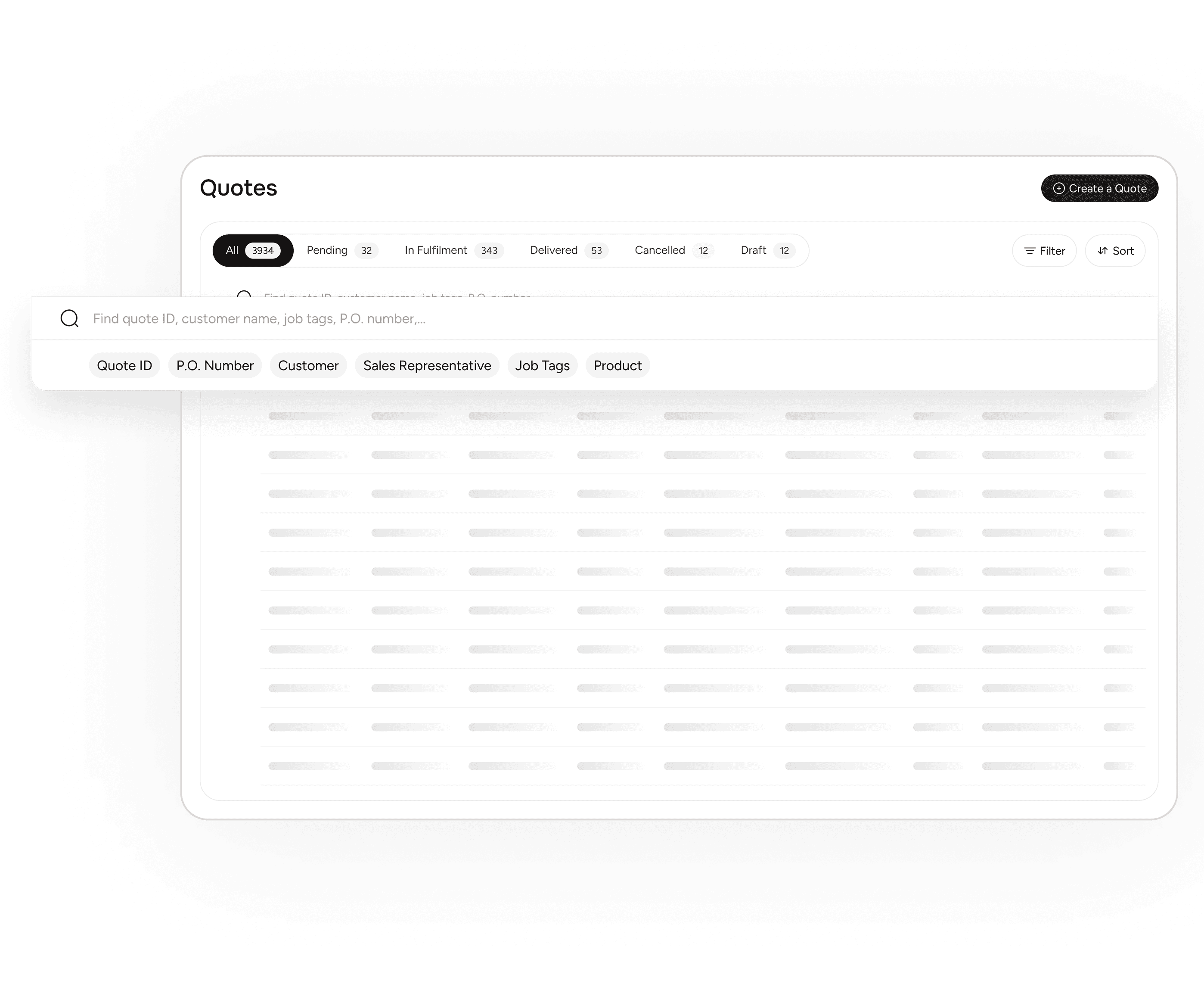
Find and Sort
Find the quote that needs attention, fast
Narrow a long list by time period, status, or customer, then sort by what matters to your team today.
- Filter by quote ID, customer name or sales rep.
- Sort by date created, due date, or amount.
No phone tag
Negotiate quotes without a call
Customers and reps discuss a quote in built-in messaging, with PDFs and images attached to the thread, and SMS and WhatsApp from one company number.
Works with
Orders
Every order from every channel, in one place.
Messages
SMS and WhatsApp from one company number.
CRM
Profiles, pricing, credit and product access.
Common questions
Can customers negotiate a quote without calling?
Yes. Quote discussions run in built-in messaging, with PDFs and images attached to the thread.
Can customers request a quote from the website?
Yes. Quote requests from your website land in the same dashboard as quotes your team creates.
What is Assist AI?
Assist AI brings emails, texts, WhatsApp messages, quote requests and internal messages into one inbox, reads the message and its attachments, matches the items to your catalog and drafts a quote. Your rep reviews, adjusts and sends it.
Does the AI send quotes on its own?
No. Assist AI drafts the quote and your rep reviews, adjusts and sends it.
Does an approved quote become an order?
Yes. Approved quotes convert into orders, and revisions, assigned reps and due dates stay tracked.
Ready to Simplify Your Quoting Process?
Get a built-in quoting system designed for B2B eCommerce.
Book a Demo